
DAY 3
Oct 4, 2026
Day 3: Can You Spot the Phish?
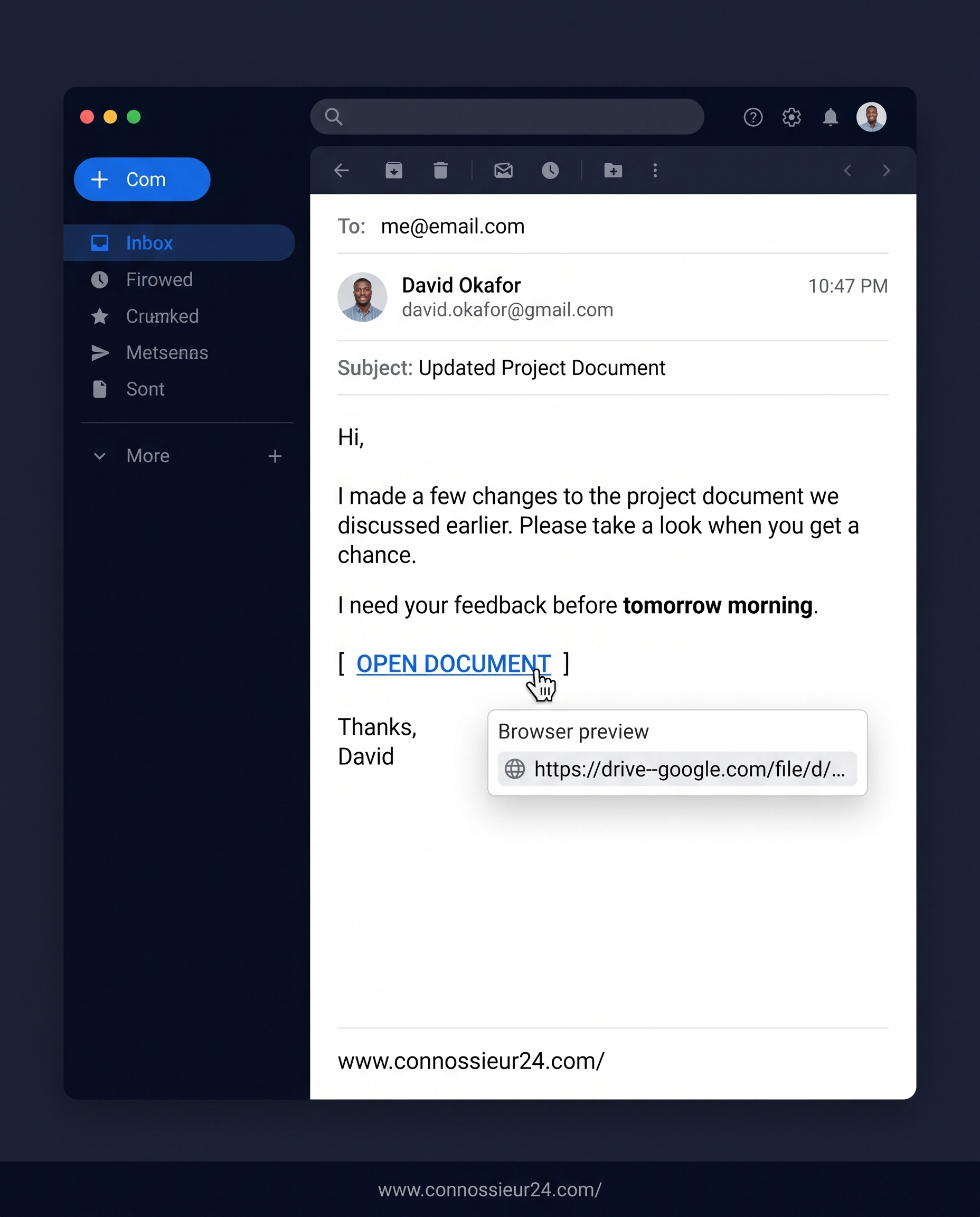
We've discussed what phishing is and broken down the mechanics behind fake security alerts. Now it's your turn to test your eye on a real-world scenario.
Take a close look at the email screenshot above. Don't just read what the message says—inspect who sent it, when it was sent, what they are asking you to do, and where the link actually leads.
How many red flags can you find before scrolling down?
The Breakdown: 4 Red Flags Hidden in Plain Sight
Here is why this seemingly harmless project update is actually a phishing attempt:
1. The Sender Domain
- What it shows: The display name says "David Okafor," but the address is
david.okafor@gmail.com. - The Red Flag: Internal project updates and corporate documents rarely come from personal consumer
@gmail.comaddresses. Always verify that the sender's email domain matches your company's official domain.
2. The Link Destination (drive--google.com)
- What it shows: Hovering over the
[ OPEN DOCUMENT ]link reveals the destination:https://drive--google.com/file/d/.... - The Red Flag: Notice the double hyphen in
drive--google.com. This is a typosquatting domain crafted to look like official Google Drive URLs (drive.google.com).
3. Late-Night Delivery with Immediate Urgency
- What it shows: The timestamp shows
10:47 PM, paired with the request: "I need your feedback before tomorrow morning." - The Red Flag: Pairing late-night delivery with a rush deadline is intended to catch you off-guard while tired, prompting you to click before verifying the details.
4. Vague Context
- What it shows: The body refers vaguely to "the project document we discussed earlier" without referencing a specific project name, file title, or team context.
- The Red Flag: Generic phrasing allows attackers to blast the same email template to hundreds of targets simultaneously.
Key Takeaway
A familiar name doesn't mean a safe email. Always pause, hover over links to check the destination URL, and confirm unexpected file shares through a separate channel before logging in or entering credentials.